
Walk down any British high street and most visits start the same way online. Someone checks whether a store is open, taps for directions, and skims for a phone number or a service like click and collect. The retailers that make those steps effortless tend to win the visit. Matalan, H&M and M&S do this well. Not because they are flashy, but because they are tidy. Their location architecture is predictable, their information is consistent, and their housekeeping never slips for long.
This guide breaks that down into something your team can put into practice across ten locations or a thousand. It focuses on the basics that drive footfall rather than baskets. Where a topic deserves a deeper dive, I’ve linked the phrase itself to a relevant resource on the Fly High Media site.
Why local SEO matters for physical retail
Local search is about useful answers delivered quickly. People want to know if you’re open today, how to get there, what the parking is like, whether the store is step-free, and if they can speak to someone. That’s it. When your pages and your profiles answer those jobs cleanly, you reduce friction. When they do not, someone else wins the trip.
Think in terms of three query types you need to serve: brand plus place, category plus place, and pure “near me”. Your store pages, your internal linking, and your Google Business Profiles should make all three paths simple.
What the leaders get right
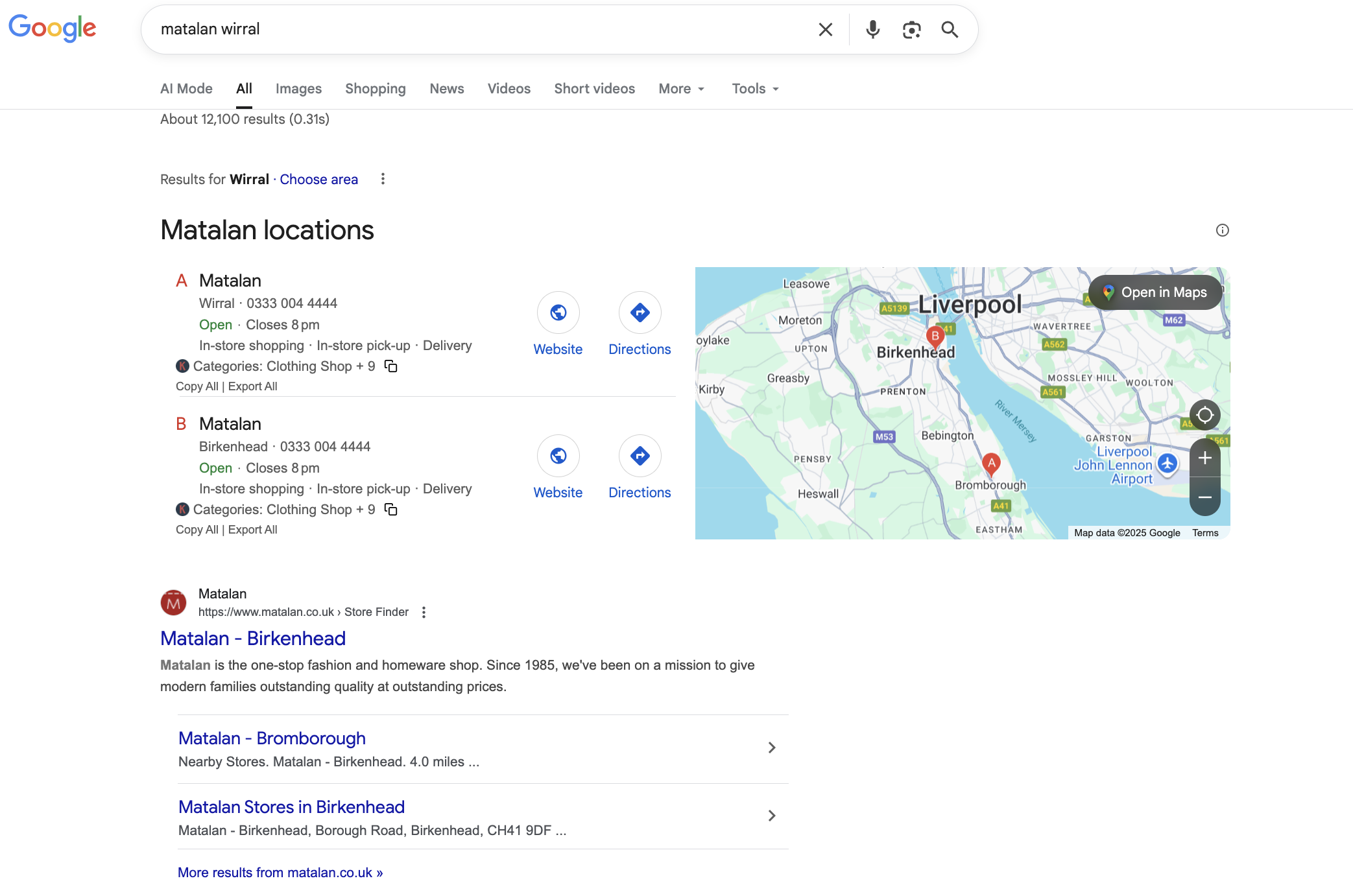
Across Matalan, H&M and M&S, you see the same steady habits. Store locators have consistent paths, so crawlers and people can get from the locator landing page to any branch in a few clicks. Location pages push name, address and phone high on the page and make today’s hours obvious on mobile. There is always a one-tap route to directions and a one-tap route to call. The template is consistent, but each page has a touch of local detail so it does not feel cloned. Their Business Profiles use sensible naming, categories that match real-world services, and photos that look current. When a store moves or closes, redirects are handled cleanly, and the old page does not sit around confusing people.
None of this relies on huge content teams. It relies on a clear template, a few governance rules, and a short weekly hygiene routine.
The store-locator and location-page blueprint
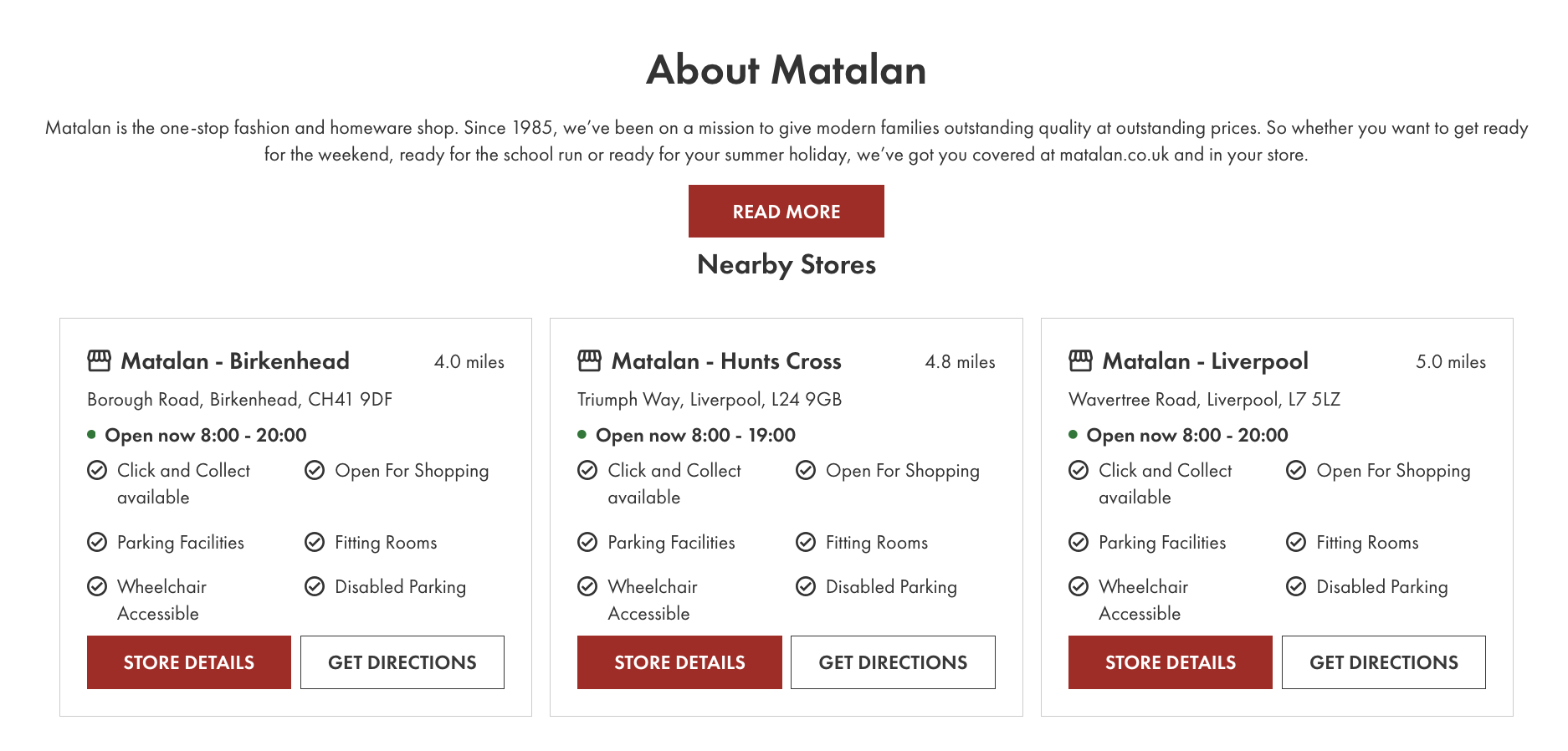
Use these live pages for structure ideas. Take the layout cues, not the wording.
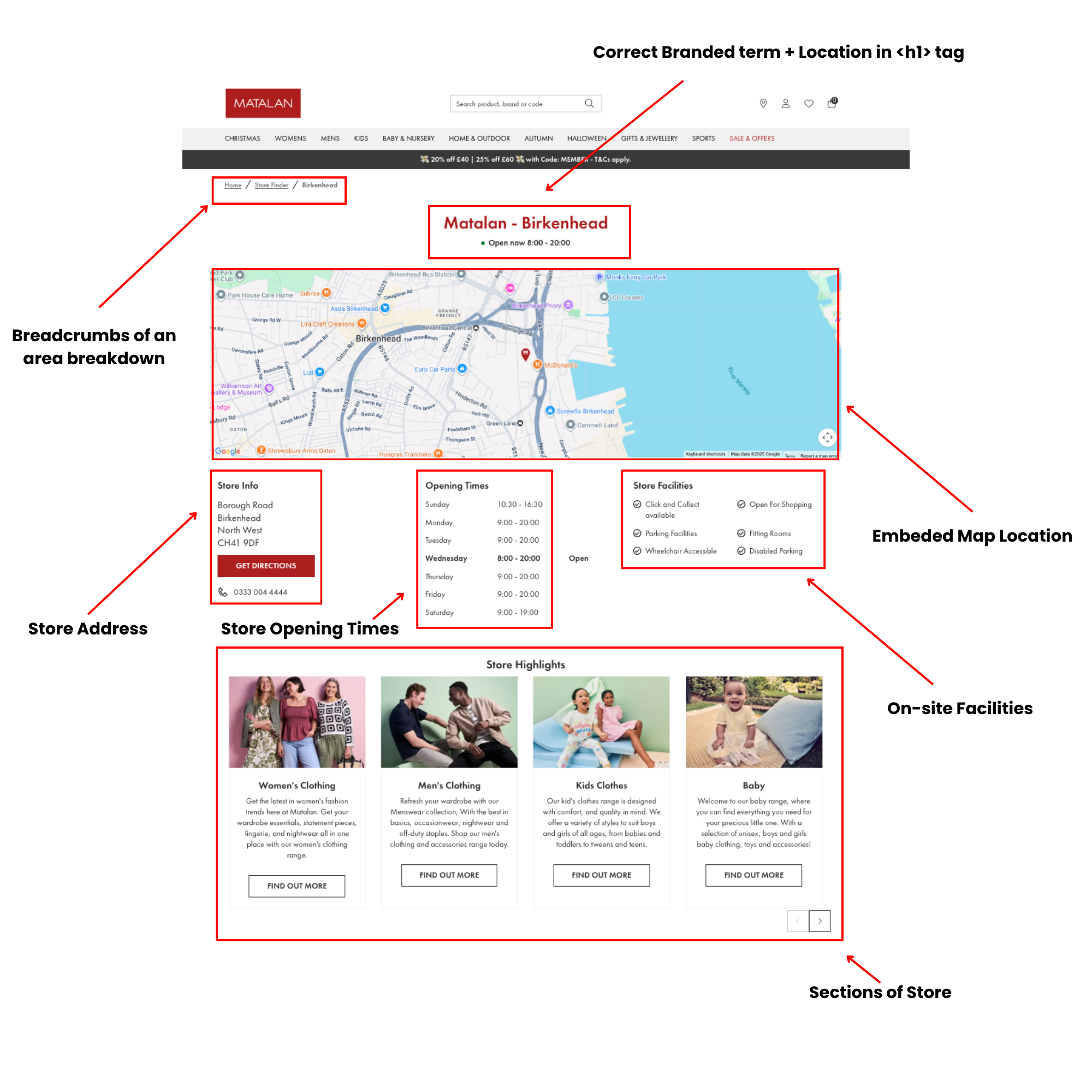
- Matalan Birkenhead: https://www.matalan.co.uk/stores/uk/north-west/birkenhead/birkenhead
- Liverpool 67-69 Lord Street: https://www2.hm.com/en_gb/customer-service/shopping-at-hm/store-locator/uk/liverpool/hm-liverpool-lord-street/gb0934.html
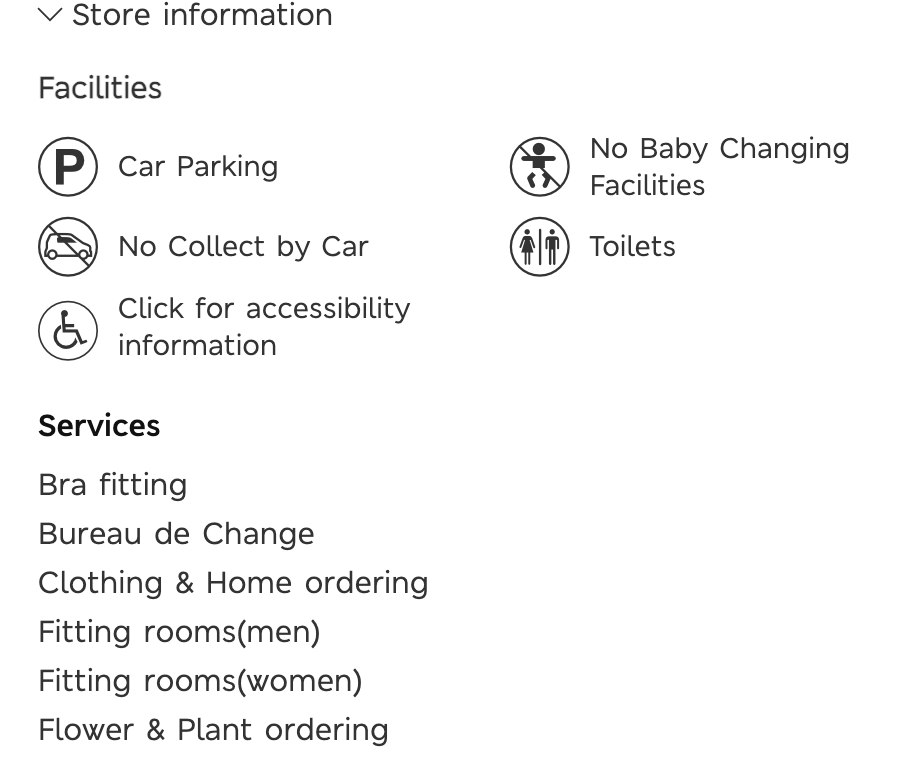
What works on both is the order of information. Start with a direct H1 that names the brand and place. Put full NAP above the fold. Show today’s hours and make the weekly schedule a simple tap. Put the click-to-call and directions buttons close together. Keep the map near those actions. Add the practical details people need in the real world. Parking rules. Step-free access. Lifts. Baby changing. List services in bullets so they are scannable. Then add a short local paragraph that mentions something recognisable to the area so the page reads like it was written for humans, not just search engines. Finish with nearby stores so there is always a plan B.
If you are putting this into your CMS, a light technical SEO audit is a good way to spot anything that will trip you up, from blocked pages to slow templates. A walkthrough like a technical SEO audit will help you catch issues before you scale.
What to include on every store page
Think of the template as a set of blocks. Keep fields structured in the CMS rather than free text so you can keep quality high as you grow.
- H1 that includes brand and place
- Full NAP, visible without scrolling on mobile
- Today’s hours with a link to the weekly view and a clear note on special hours
- Click-to-call and directions buttons
- Embedded map with a correct pin
- Parking and access notes
- Services in tidy bullets
- A short local intro with a couple of recognisable landmarks or transport links
- Local FAQs based on what people ask your team
- Nearby stores and a link back to the city hub
- Breadcrumbs for orientation
For discovery and consistency across hundreds of pages, an up-to-date XML sitemap helps you surface new or changed locations and is easy to manage in batches. If you need a primer for the team, this explainer on XML vs HTML sitemaps is a good place to start.
Structured data that backs it up
Add LocalBusiness structured data to each store page so search engines can read the same facts you show users. Include the name, address, phone, geo coordinates, and a full openingHoursSpecification that covers special hours. If you include a short FAQ section, FAQPage markup is a simple win. Keep the structured data in step with the on-page details. If they drift, trust erodes.
Google Business Profile at scale
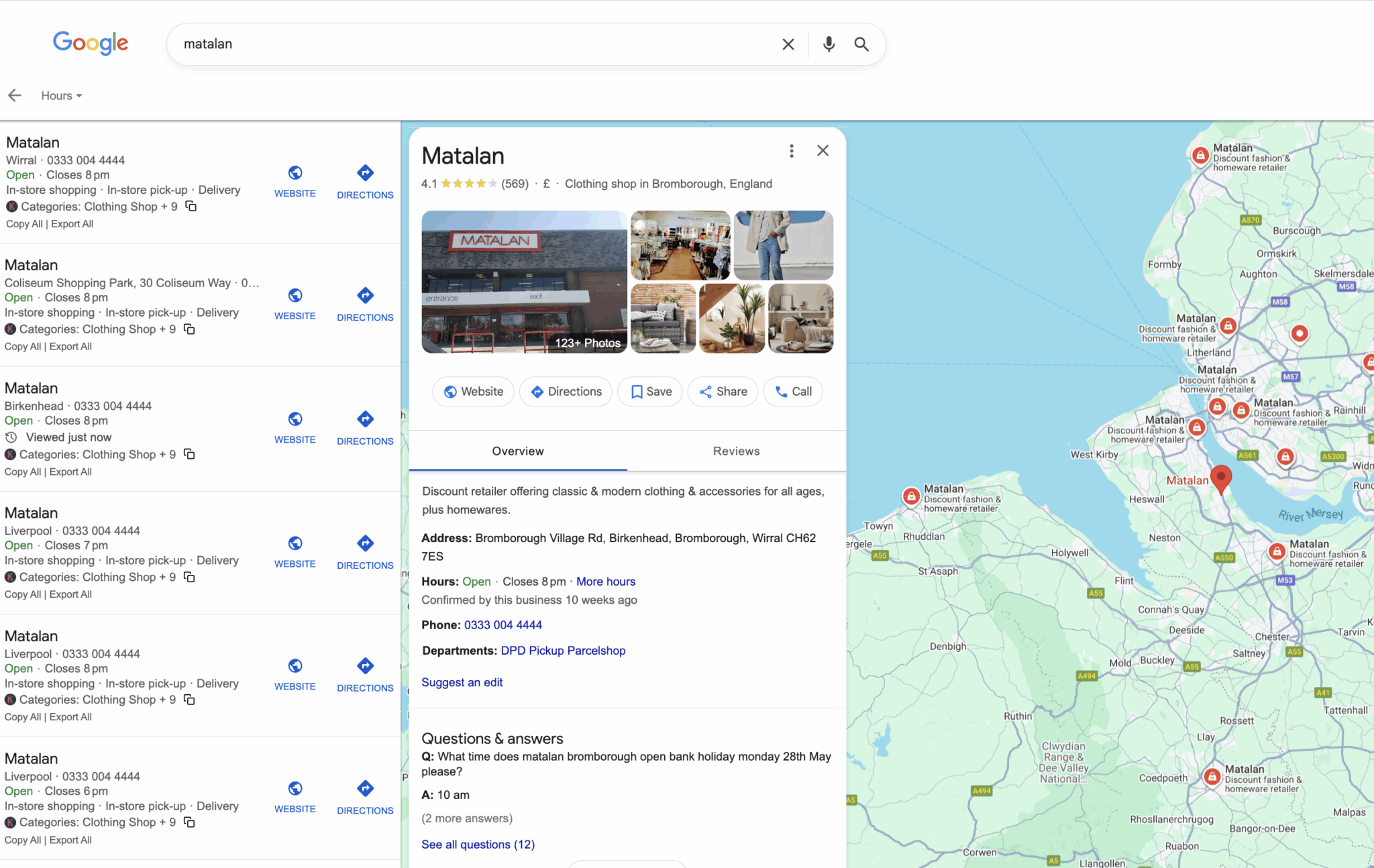
Treat each profile like a second homepage for that store. The data should match the store page, and updates should run on a simple schedule rather than depending on someone’s spare time. Keep all locations under one primary account, set a naming convention that mirrors the brand in the real world, and use the same categories across stores that offer the same service.
Photos are underrated. Exterior, entrance and a couple of interior shots help people recognise the site when they arrive. Add a fresh set when branding changes or the store is refurbished. Q&A and reviews are part of the same loop. Seed a few helpful questions and answer them properly. Reply to all reviews in a friendly, short tone. For practical tips your team can act on today, there is a straightforward post on Google Business Profile tips.
UTM tags on the website and appointment links make reporting easier. That way you can see calls, direction requests and clicks in one place and compare stores like-for-like.
NAP consistency that actually sticks
Name, address and phone are the base layer. Decide on a single source of truth, write down who owns it, and sync from there. Many brands use the CMS as the master and feed the same data into Business Profiles and the main directories. When a store moves or closes, keep a short closure message live for a period, set the Business Profile to closed, and 301 from the old URL to the nearest relevant page, usually the city hub or the replacement store. A tidy citation pass can sit inside your wider link-building work rather than becoming its own project; if you want some quick help from the team, this overview of free link-building tools is useful for triage.
URL structure that scales
A human-readable pattern makes life easier for shoppers and crawlers. Something like /stores/region/city/store-name works across estates of all sizes. Keep it lowercase. Use hyphens between words. Decide once on trailing slashes. Keep exactly one canonical per store. If a store moves, 301 the old page to the new one. If you run two branches in the same town, add a suffix that people will recognise, such as the retail park or street.

Internal links that help people and spread authority
Treat your locator like a pyramid. The locator homepage links to regions, regions link to cities, cities link to all stores, and each store links back to the city hub and across to nearby stores. This lets people compare options quickly and gives crawlers multiple paths to every page. An HTML store index can help if your main nav is compact. On the technical side, an XML sitemap per region is a simple way to keep things organised as your list grows, and the article on XML vs HTML sitemaps covers when to use each.
Avoiding duplicate content without writing essays
Cloned store pages are a common reason for weak visibility. The fix is not to write long essays for each branch. It is to add a small amount of genuine local detail.
Write a short introduction that mentions a landmark, retail park or transport link people know. List the services that differ at that branch. Add parking and access notes that are specific. Include a photo or two from the actual site. Keep titles, H1s and meta descriptions unique enough that a real person could tell the difference. Use canonicals for true duplicates only, such as a temporary refurbishment page that mirrors the main store page while work is underway.
If your team is building a lot of these pages and wants a process to keep quality consistent, a periodic content audit is a sensible backstop. This post on content auditing covers what to check and how often.
Content ideas that stay focused on store visits
Keep the content grounded in the trip. Parking rules. Bus and train links. Step-free access. Lifts. Baby changing. Services like click and collect or alterations. Seasonal notes that matter locally, such as back-to-school or Christmas hours. If you are coordinating activity across channels, it helps to think of this as part of your wider local SEO programme rather than a one-off copy task.
Implementation for multi-site businesses
The template is the easy bit. The rollout is where projects wobble. Start with a small pilot that covers a mix of store types, for example, a city centre site with heavy public transport use and a retail park with easy parking. Build the page type with structured fields for each block so your team is filling in slots, not writing essays. Wire in a data feed for hours and special hours so seasonal changes do not rely on manual edits. Agree on the naming convention and categories for Business Profiles in writing and keep access under one roof.
When going through the process of setting up multi-site locations, it is a large task. However, with the right planning, SOPs and ownership, it will be manageable. You may want to setup an internal tracker such as the one below.
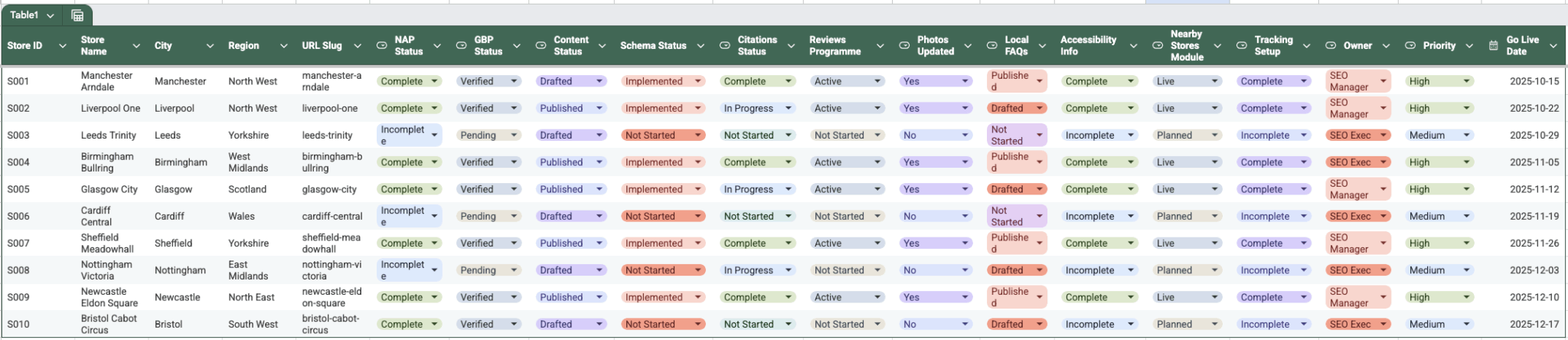
Download template (Click “Make a Copy” and save to your drive).
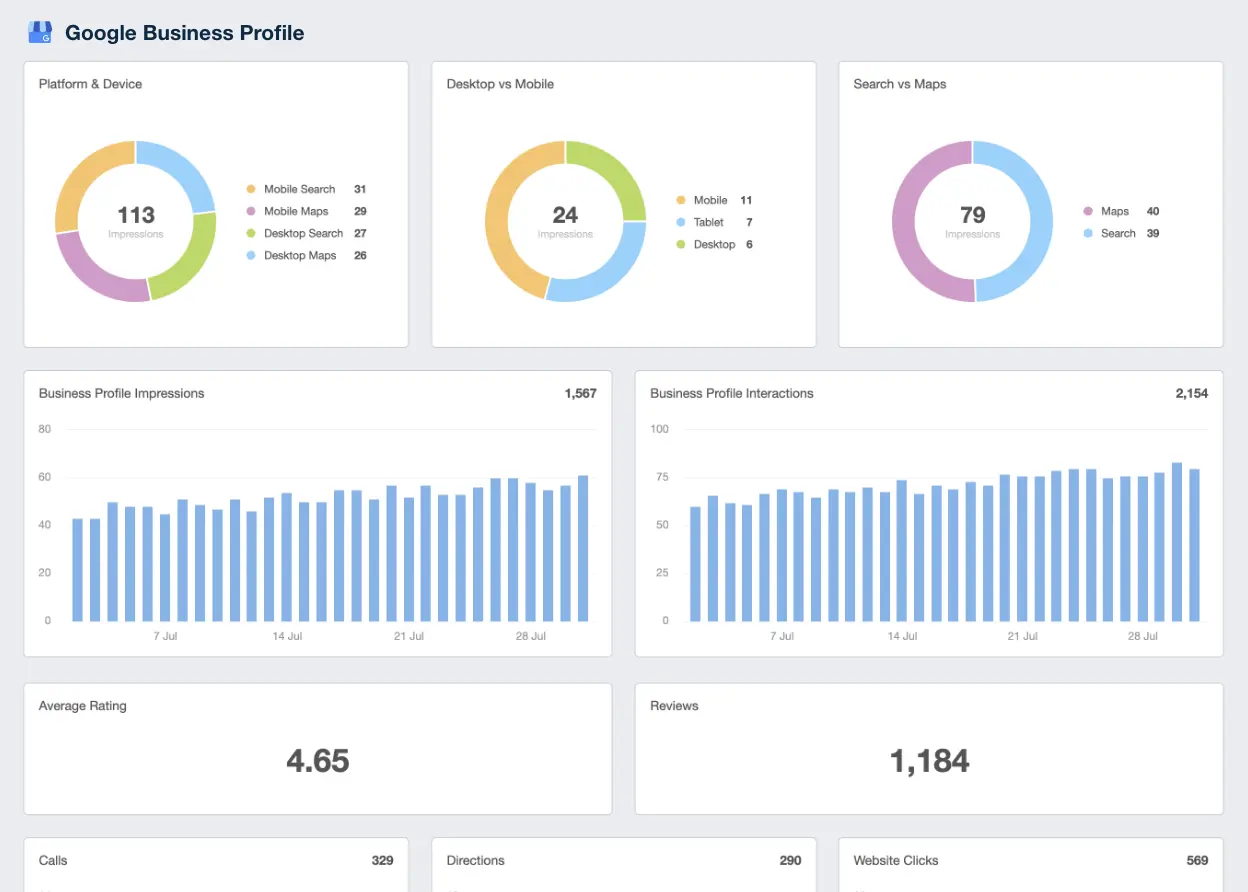
Publish the pilot and watch the basics before you scale. On store pages, track clicks to call and clicks for directions. In Business Profiles, keep an eye on calls, direction requests and website clicks. Look at non-brand category queries by store to spot gaps. If you find thin pages or slow pages, run a short technical SEO audit to catch the root causes rather than guessing.
A realistic 90-day plan
You do not need a year to prove this. Three tidy months will do.
Weeks 1 to 2
Agree the template and write a one-page rulebook for naming, URLs, schema and Business Profile settings. Gather NAP, services, parking and access details for each pilot store in one place. Make sure you have a simple photo brief so store teams know what to send.
Weeks 3 to 6
Build the template, add LocalBusiness structured data, and test it. Publish ten stores. Check mobile behaviour and fix snags around buttons, maps and tracking. Update Business Profiles for those stores with current photos, accurate hours and seeded Q&A.
Weeks 7 to 10
Roll out in batches. Add region and city hub pages if they help people find the right branch faster. Split your XML sitemap by region if the list is long and submit changes as you go. Add nearby-stores modules and tidy internal links at the same time.
Weeks 11 to 12
Run a citation tidy-up for the main directories. Launch a reviews routine with short reply templates. Finalise a dashboard that shows calls, direction requests and website clicks by store. Document your closure and relocation process so nothing is left to chance.
Common pitfalls and simple fixes
Bank holiday hours get missed. Map pins are wrong. Phone numbers ring out. Two pages in the same town look identical. A store moves and the old page sits live with no redirect. Each one has a small fix. Set a seasonal cut-off date for special hours. Verify geo coordinates once and keep them in the template. Test click-to-call on mobile. Add a couple of specific details for stores in the same town so shoppers can tell them apart. Use 301s as part of a standard relocation process.
If you are coordinating a campaign around a key season, it is worth pairing this work with some focused content marketing so the city and category pages you link to are worth landing on. A gentle primer on growing your brand through content is handy if you have newer team members.
Short reference for your CMS spec
A few bullets your developers can paste into a ticket so the page type is built correctly first time.
- Fields: H1, short intro, full NAP, today’s hours, weekly hours, special hours, click-to-call, directions, embedded map, parking and access, services, local FAQs, nearby stores, breadcrumbs.
- Structured data: LocalBusiness with name, address, telephone, geo, openingHoursSpecification, sameAs, hasMap and an image.
- Internal links: to the city hub and two to four nearby stores.
- Tracking: events on click-to-call and directions.
- Sitemaps: add store pages to regional XML sitemaps for easier batching.
Bringing it together
The reason Matalan, H&M and M&S tend to win on local is not a secret tactic. It is tidy execution of the same simple habits at scale. Make it easy to confirm you are open. Make it easy to get directions. Make it easy to call. Say what services you offer at that branch. Keep the data on the site and the profile in sync. Use a clean URL pattern and helpful internal links. Avoid duplicate pages by adding small, genuine local touches. Do those things, put a little polish on the photos and reviews, and keep a short hygiene routine. That is how you build trust with people and with search engines.