
Internal Linking is a vital part of helping both users and search engines navigate around your website.
Using internal links can help Google build up a hierarchy of pages on your website by giving more value to more important pages that you would like to rank as opposed to less valuable pages. The more internal links pointing towards pages, the more often Google will visit those pages, as it sees those pages as more valuable!
What are Internal Links?
Put simply, they are one page on your website linking to another page on your website. They come in two forms: Navigational links and Contextual links.
Navigational Links
Navigational links are either links within your menus at the top of the page or they could be sidebar navigation links or even links in your footer to help the user navigate from one page to another.
Contextual Links
Contextual links occur within landing pages or blog articles. They point towards related and interesting content that supplements what you are writing about. They help Google understand what the page is actually about, why is why a good internal linking structure is important.
Internal Links vs External Links
This article is purely about how you can build more internal links within your own website, but at the same time, it is also important to leverage external sources to improve your SEO. External links can be seen as citations to provide validity to points and show authenticity. For example, if you were quoting a statistic, it would be best practice to link back to the original source.
Tip: Always open external links in new windows to avoid people leaving your site completely.
Internal Linking Strategies and Best Practices
Here are some methods that can help you improve the quality of your internal links. To assist you, here is a diagram to help illustrate what your internal structure should look like for optimal results.
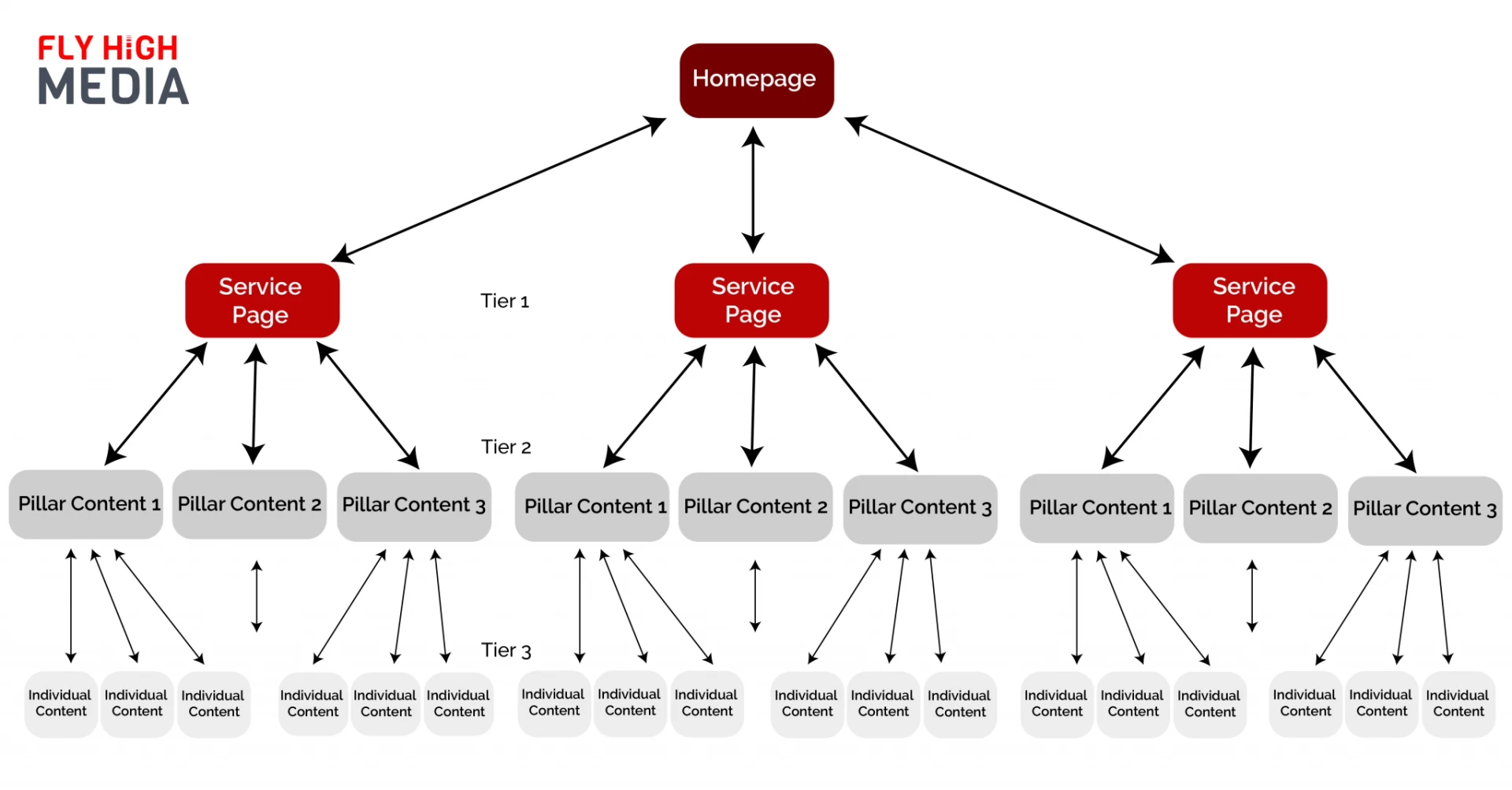
Use Descriptive Anchor Text
Let’s say you have an ecommerce website and you are looking to build internal links to a category page. Let’s use the example of a subcategory selling men’s shoes. Whenever making reference to that page, you should be using anchor text such as “men’s shoes, men’s trainers, men’s sliders, men’s formal shoes”, whichever is the most relevant to your products. It is important to have different variations, as you don’t want to have the exact same anchor text each time.
Tip: Revisit old webpages and check if you have hyperlinks and text saying “click here” and change this to something descriptive.
Old: “To check out our new trainers, click here”
New: “We strongly recommend you check out our new trainers”
Link to Highly Contextual Pages
When looking for potential pages to link to, be sure they are relevant. The more contextual links you have, the more Google can understand your website and content and therefore reward you. For example, you may have a pillar piece of content called “The Ultimate SEO Plugin Guide”; if you have similar pieces of content, such as reviews of specific plugins, it would make sense to link to those articles.
Automate the Process
As time goes on, the content will accumulate on your website, making it more difficult to revisit old content manually; however, there is an awesome tool called Link Whisper, in which you can create powerful links within minutes.
On Shopify or WordPress, Link Whisper helps you significantly find suitable content to link to within your site and insert links very quickly.
Closely Monitor Links
Nobody likes a broken link. It is bad for your SEO and for your user’s experience on your website. Using Link Whisper, you can monitor broken links, or there are several other plugins too, such as RankMat,h that will flag them up and help you set up 301 redirects.